For any entrepreneur in South Africa, the path to success often leads through the CIPC eServices platform. But conquering this essential tool can feel like navigating a digital jungle, with the CIPC login serving as the initial hurdle. Fear not, intrepid business builders! This introduction delves into the CIPC login, demystifying its purpose, untangling its intricacies, and equipping you with the knowledge to unlock its immense potential.
Whether you’re a seasoned veteran of company registrations or a wide-eyed startup founder, this introduction will illuminate the path to a seamless CIPC login experience. We’ll explore:
- The Essential Role of CIPC Login: What treasures await behind the login wall, from registering your business to filing annual returns and managing intellectual property?
- Navigating the User Types: New user? Registration steps simplified! Existing user? Credentials in hand, you’re good to go!
- Conquering Login Challenges: From typos to technical glitches, we’ll equip you with troubleshooting tips to vanquish any login obstacles.
This introduction isn’t just about unlocking a platform; it’s about opening a door to streamlined business management, efficient legal compliance, and ultimately, entrepreneurial success. So, prepare to shed the login anxiety and embrace the CIPC eServices platform with confidence. The adventure begins now!
What Is CIPC Login?
The CIPC Login is the secure access point to the Companies and Intellectual Property Commission (CIPC) eServices platform in South Africa. It allows registered users to:
- Manage their businesses: This includes registering new companies, filing annual returns, amending company details, changing names, and submitting various legal documents.
- Access intellectual property (IP) services: Users can file trademark applications, renew registrations, and manage existing IP rights.
- Retrieve vital information: The platform provides access to company search tools, historical documents, and financial reports.
Essentially, the CIPC Login acts as the digital key to a comprehensive suite of online services for South African businesses and entities dealing with intellectual property. It simplifies bureaucratic processes, facilitates compliance, and empowers users to manage their affairs efficiently.
Here’s a breakdown of the login process:
- User Types: There are two types of users: new users who need to register, and existing users who already have a CIPC customer code and password.
- Login Credentials: New users provide ID/passport numbers and set passwords during registration. Existing users use their CIPC customer code and password.
- Login Platforms: CIPC login can be accessed through two platforms:
- CIPC eServices: Primarily for company and business management.
- BizPortal: Offers a broader range of government services, including business registration using CIPC credentials.
Understanding the CIPC Login and its purpose empowers businesses and individuals to navigate the South African administrative landscape with ease. It’s a one-stop shop for managing essential compliance tasks, accessing valuable information, and ultimately, fostering a vibrant business environment.
CIPC Login: How To Login to CIPC South Africa?
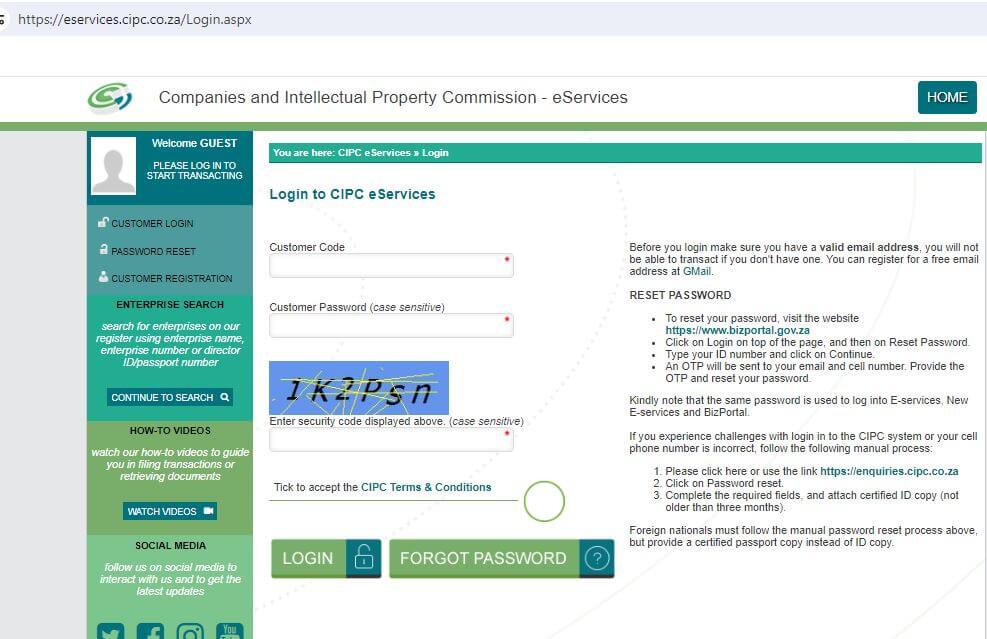
Logging into the CIPC eServices platform in South Africa is quite straightforward, but the process can differ slightly depending on whether you’re a new user or an existing one. Here’s a breakdown for both scenarios:
For New Users:
-
Navigate to the CIPC eServices website: Click on this link: https://eservices.cipc.co.za/.
-
Click on “CUSTOMER REGISTRATION”: You’ll find this button on the right side of the homepage, just below the login section.
-
Choose your user type: Select whether you’re a South African resident or a non-resident.
-
Enter your ID or passport number: Provide your South African ID number or your passport number, depending on your chosen user type.
-
Complete the registration form: Fill in the required information, including your name, contact details, and security questions.
-
Set your CIPC login password: Create a strong password for your CIPC account.
-
Receive verification: You’ll receive a One-Time Pin (OTP) either via email or SMS to verify your registration. Enter the OTP to complete the process.
-
Log in with your newly created credentials: Now you can use your ID number/passport number and password to log in to the CIPC eServices platform.
For Existing Users:
- Go to the CIPC eServices website: Use the same link as before: https://eservices.cipc.co.za/.
- Enter your CIPC login details: In the login section on the homepage, provide your 13-digit South African ID number and your CIPC password.
- Click “Login”: You’ll be directed to your CIPC eServices dashboard.
CIPC Login Problems
Here are some general troubleshooting tips for CIPC login problems:
- Refresh the page or restart your browser. Sometimes, a simple refresh can resolve temporary glitches.
- Clear your browser cache and cookies. Cached data can sometimes interfere with website functionality.
- Ensure you’re using the correct credentials. Double-check your ID number/passport number and password for any typos or case sensitivity issues.
- Request a password reset if you’ve forgotten your password. Click on “Forgot Password” on the login page and follow the instructions.
- Check for system maintenance. CIPC occasionally schedules system maintenance during which login might be unavailable. You can find information about scheduled maintenance on their website.
- Contact CIPC customer support. If none of the above steps work, you can contact CIPC customer support for further assistance. You can reach them through their website or by calling their helpline
CIPC Login FAQs
Logging into the CIPC eServices platform can be straightforward, but encountering a snag every now and then is unavoidable. Here are some answers to frequently asked questions about CIPC login:
Q: I’m a new user. How do I register for a CIPC account?
A: Visit the CIPC eServices website (https://eservices.cipc.co.za/) and click “CUSTOMER REGISTRATION.” Choose your user type, provide your ID/passport number, and complete the registration form. Set a strong password and verify your account with the received OTP.
Q: I forgot my password. How do I reset it?
A: On the login page, click “Forgot Password.” Enter your ID number and choose how you want to receive the reset link (email or SMS). Follow the instructions in the link to set a new password.
Q: Why is my login failing?
A: Double-check your ID number/passport number and password for typos or case sensitivity issues. Ensure you’re using the correct login platform (CIPC eServices vs. BizPortal). Refresh the page or try a different browser. Also, verify if scheduled system maintenance is ongoing.
Q: I get an error message while logging in. What does it mean?
A: Different error messages can indicate various issues. Contact CIPC customer support for specific assistance. Explain the error message and the steps you’ve taken so far to resolve it.
Q: Can I use my CIPC login for BizPortal?
A: Yes, but only for business registration. When registering a business on BizPortal, you can choose to verify your identity using your CIPC customer code and password. However, accessing other BizPortal services might require separate registration.
Q: How can I contact CIPC customer support?
A: You can reach them through their website (https://eservices.cipc.co.za/) or by calling their helpline at +27 12 394 3600. Their website also offers FAQs and online tutorials for using the eServices platform.
Bonus Tip: Keep your CIPC login credentials confidential and avoid sharing them with anyone. Regularly update your password and be cautious about suspicious emails or websites purporting to be from CIPC.
Conclusion
Whether you’re a seasoned entrepreneur or a business newbie, navigating the CIPC eServices platform can feel like tackling a bureaucratic labyrinth. The initial hurdle often lies in that seemingly simple act – logging in. But fear not, weary traveler! By demystifying the CIPC login process and equipping you with handy troubleshooting tips, this article has hopefully illuminated the path forward.
Remember, a successful CIPC login hinges on:
- Understanding your user type: New user? Follow the registration steps! Existing user? Simply enter your credentials.
- Mindful credential input: Double-check your ID number/passport number and password for accuracy. Case sensitivity matters!
- Troubleshooting savvy: A simple refresh or clearing your browser cache can work wonders. For more persistent issues, CIPC customer support is just a click or call away.
The benefits of mastering the CIPC login are immense. From registering your business and filing annual returns to managing intellectual property and retrieving valuable documents, the eServices platform unlocks a treasure trove of functionalities.
So, take a deep breath, conquer those login jitters, and embark on your CIPC journey with confidence.
Image Credit: https://eservices.cipc.co.za/Login.aspx
